DogTimer
A downloadable tool for Windows and macOS
【日本語】このツールについて / About This Tool
かわいいワンちゃんがあなたの作業をそっと応援してくれる、集中特化型のデスクトップタイマーです。 タイマーの作動状況や「現実の時間」に合わせて、画面内の世界がリアルタイムに変化し、あなたの作業空間を優しく演出します。
■ 主な特徴と機能
- 現実の時間と連動する「お部屋の光」: アプリがPCの内部時刻(現実の時間)を読み取り、朝・昼・夕方・夜に合わせて、お部屋の中の光の色がリアルタイムに美しく変化します。ワンちゃんと一緒に、時の移り変わりを感じながら作業ができます。
- 集中モード(タイマー作動中): STARTを押すと、ワンちゃんは静かにすやすやと眠りにつきます(
sleepモード)。同時に、BGMにローパスフィルターがかかってフワッと音がこもり、視覚的・聴覚的にあなたの集中力を高めます。 - 休憩・通常モード(タイマー停止時): STOPやRESETを押した時、またはタイムアップ時は、ワンちゃんがムクッと起き上がって画面内を自由にお散歩し始めます。BGMのフィルターも解除され、クリアな音に戻ります。
■ 各ボタン・UIの使い方
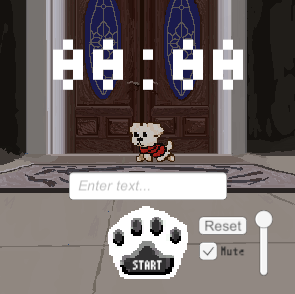
- 時間入力欄(InputField): 集中したい時間を「分」または「分:秒」(例:
25や25:00)の形式で入力します。 - START / STOP ボタン: タイマーを開始、または一時停止します。
- RESET ボタン: タイマーを強制終了し、入力した最初の時間に戻します。
- BGM(Toggleスイッチ): 背景音楽のON/OFFを切り替えます。
- 音量シークバー(Slider): BGMの音量をあなたの好みに合わせて滑らかに微調整できます。
■ クレジット・開発について
- 制作: 音楽(BGM・アラーム)およびベースコードの一部を除き、デザイン、イラスト、アニメーション、スクリプト構築を含め、すべて自作で開発しています。
- バグ・不具合について: 個人開発のため、もし起動しない、挙動がおかしい等の不具合を見つけましたら、ぜひお気軽にコメント欄やご報告フォームにて教えていただけると幸いです!
【English】About This Tool
A minimalist, high-focus desktop timer featuring a cute dog that keeps you company while you work or study. The room's atmosphere and the dog's behavior change dynamically depending on real-world time and your timer status to create the perfect working environment.
■ Key Features
- Real-Time Room Lighting: The app automatically syncs with your PC's internal clock. The lighting color inside the room shifts beautifully in real-time to match Morning, Afternoon, Evening, and Night. Experience the natural passage of time right alongside your puppy.
- Focus Mode (Timer Running): When you click START, the dog falls into a peaceful sleep. Simultaneously, a low-pass audio filter is applied to the BGM, lowering the frequency to create a cozy, distraction-free soundscape that enhances your deep focus.
- Break / Idle Mode (Timer Stopped): When you click STOP, RESET, or when the time is up, the dog wakes up and starts casually walking around your screen. The audio filter turns off, bringing the music back to crisp clarity.
■ UI & Button Guide
- Time Input Field: Enter your desired focus time in "minutes" or "minutes:seconds" (e.g.,
25or25:00). - START / STOP Button: Starts or pauses the countdown.
- RESET Button: Stops the current timer and reverts back to your original input time.
- BGM Toggle Switch: Turns the background music ON or OFF.
- Volume Slider: Smoothly adjusts the BGM volume to fit your preferred desktop setup.
■ Credits & Bug Reports
- Assets & Development: Except for the background tracks/alarm audio and some base code structure, all illustrations, animations, UI layouts, and core scripts are entirely self-made.
- Bug Reports & Feedback: This is an indie personal project. If you encounter any bugs, glitches, or unexpected behaviors, please feel free to let me know in the comments. Your feedback is highly appreciated!
音楽:BGMer
Download
Install instructions
【日本語】インストール手順 / How to Install
■ Windows版の動かし方
- ダウンロードした
WorkTimer_Windows.zipを右クリックして「すべて展開(解凍)」します。 - 展開されたフォルダの中にある
WorkTimer.exeをダブルクリックすると起動します。 ※注意:フォルダ内の他のファイルやフォルダは削除したり移動したりしないでください。
■ Mac版の動かし方
- ダウンロードした
WorkTimer_Mac.zipをダブルクリックして解凍します。 - 現れた
WorkTimer_Mac.app(またはアプリ名)を起動します。 ※注意(Macのセキュリティ警告が出る場合): ネットからダウンロードしたアプリのため、「開発元を検証できないため開けません」と警告が出ることがあります。その場合は、アプリを「右クリック(または二本指タップ) ➔ 開く」を選択し、ポップアップ画面でもう一度「開く」を押すと次回から普通に起動できるようになります。
【English】Download & Install Instructions
■ For Windows Users
- Right-click the downloaded
WorkTimer_Windows.zipand select "Extract All". - Open the extracted folder and double-click
WorkTimer.exeto launch the app. Note: Please do not move or delete any other files or folders inside the directory.
■ For macOS Users
- Double-click the downloaded
WorkTimer_Mac.zipto unzip it. - Double-click
WorkTimer_Mac.appto launch the app. Note (If a security warning appears): Since this app is downloaded from the internet, macOS might show a warning saying "App cannot be opened because the developer cannot be verified". To bypass this, right-click (or two-finger tap) the app icon, select "Open", and then click "Open" again in the dialog box. You only need to do this once!
Leave a comment
Log in with itch.io to leave a comment.